This article mainly explains how separating data-request and compute nodes, mounting NAS, and expanding swap space make it possible to shut down expensive compute nodes at any time, avoid conflicts when fetching data from thetadata, share downloaded data and execution results, and save memory, ultimately reducing budget waste during quantitative-parameter research.
Background
Quantitative trading strategies must be effective, and their parameters must also be mathematically proven effective through backtests over a recent period.
The QuantAda quantitative trading framework uses the optuna framework for parameter exploration. Although my laptop has a 16C, 32G configuration and is more than capable of running daily stock backtests, it struggles with options-strategy research. In particular, when running at the default 85% performance, the fan noise is very loud at night.
Therefore, for options-strategy parameter exploration, I decided to rent a preemptible instance in Virginia, USA. After running it in practice, however, I found that all cores were not fully utilized for much of the time, a single thetadata account could have only one session, and 64G of memory was insufficient.
Server Selection
Node
Because thetadata’s main server is located near Virginia, and cloud-server hourly rates in Virginia are considerably lower than those in Silicon Valley, I chose that region.
Configuration
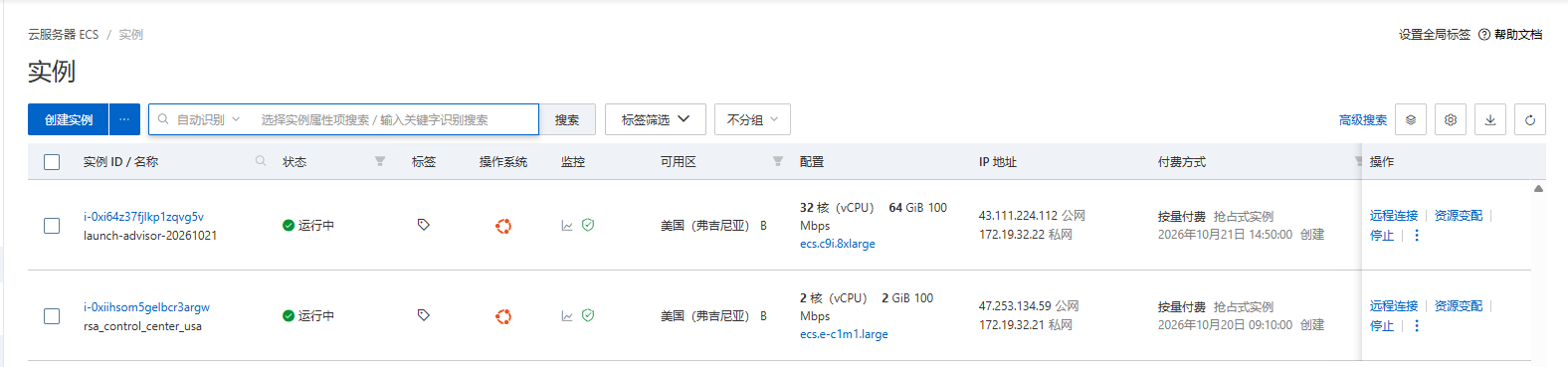
The quantitative framework’s –n_jobs parameter specifies how many cores to use. In theory, more cores mean shorter execution times. However, cloud providers charge a premium for higher core counts, so a 32C instance is just right. The price difference between 32G and 64G memory instances is also small, so a 32C64G preemptible instance with a 128G disk is sufficient.
Price List
| Item | CPU | MEM | Price |
|---|---|---|---|
| Virginia preemptible instance | 32C | 64G | ¥1.502568/hour |
| 2C | 2G | ¥0.1062/hour | |
| NAS capacity tier | ¥0.001/GB/hour |
Splitting
Because quantitative-parameter training and exploration must fetch data before execution, the 32C64G instance keeps incurring charges while fetching thetadata’s extremely slow data source.
Therefore, create a separate 2C2G instance and use the framework’s –fetch_only parameter. The same training command will then fetch data on the 2C2G instance without actually running training. Once the 2C2G instance finishes downloading, you can create a 32C64G preemptible, pay-as-you-go instance whenever needed, read the cached downloaded data, and start training immediately.
NAS
Shared Data
During routine deployment, training, and data downloads, I previously had to repeatedly configure the CI target, manually create virtual environments, install dependencies, clean up logs, and so on.
NAS costs less than the disks or network drives of cloud-server instances, so it can be used to store the shared environment and cached downloaded data for reuse throughout the server’s deployment region.
Mount the NAS instance you created at /nas on both servers, and point the CI target to the /nas directory on 2C2G as well. On either machine, create a .venv virtual environment for the project under /nas and install the dependencies, then use the script below to create a symbolic link for the setup to take effect.
Shared Scripts
Environment Configuration
env.sh
1 | export PYTHONPATH=/root/QuantAda:/root/QuantCasper |
Usage
. env.sh
SWAP Virtual Memory
Because memory prices have surged recently, simply expand SWAP to match the amount of RAM.
Of course, you can first run a small number of jobs and estimate the required size from the memory consumed by each job.
Usage (see the appendix at the end for the detailed script logic)
./create_swap.sh 32G
Execution Sequence
- 2C2G deploys the project, creates the environment, installs dependencies, and sources env.sh
- 2C2G mounts NAS and uses –fetch_only to download data
- Once the data is ready, create a 32C64G instance and create swap virtual memory
- 32C64G mounts NAS and sources env.sh, sets –n_jobs to 31 to create 31 jobs, runs training at full speed, and stores log files under /nas
- 2C2G starts downloading new backtest data for training
- When the previous 32C64G training round finishes, start immediately if the new data is ready; otherwise, destroy the instance and wait for the download to finish
- 2C2G collects all training-result log files under /nas
Alternatively, you can turn the 2C2G instance into an image and release both instances. This saves money while allowing the download and training instances to start quickly.
Appendix: Creating the swap Script
create_swap.sh
1 |
|